GridPeek Tab: A Chrome New Tab Extension With 66 Widgets and 19 Website Tools
GridPeek Tab is a free Chrome extension that replaces your new tab page with pages you build yourself: shortcut tiles, folders, notes and 66 widgets, plus 19 tools that work on every website you visit. Some are everyday things like a calendar or a Pomodoro timer. Others are things people usually pay a separate subscription for, like a teleprompter, a site blocker, a page-change watcher or dictation. Everything is stored in your own browser, and there are no accounts, ads or tracking.
Add GridPeek Tab to Chrome · See it on the GridPeek Tab page · Read the privacy policy
We built it because we were tired of paying for five apps to do five small jobs, each with its own login and its own monthly bill. The new tab is the page you open more than any other. It might as well do some work.
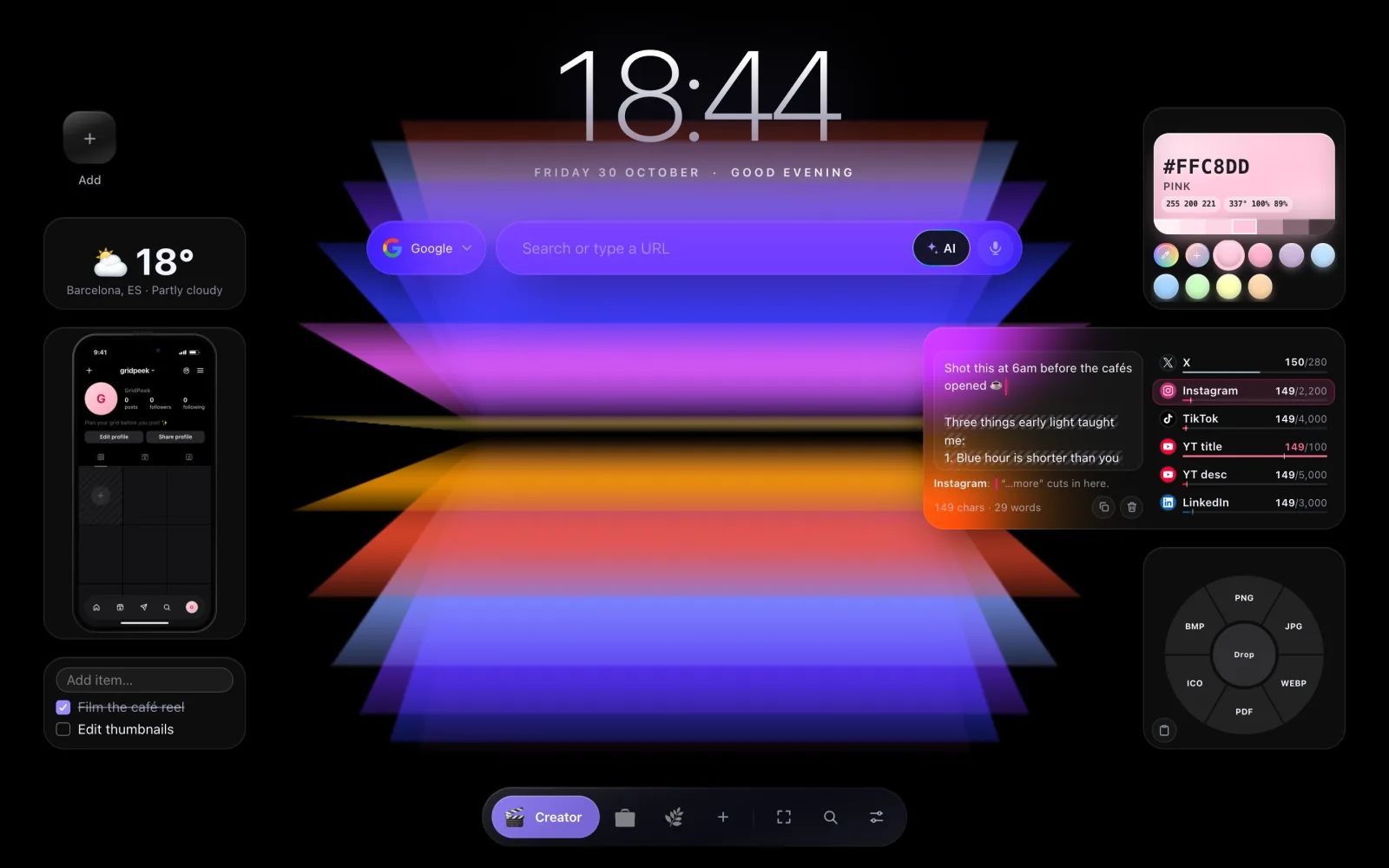
What does GridPeek Tab actually do?
You get pages instead of one cluttered screen. Make a Work page, a Creator page and a Home page, and switch between them from the bar at the top. Each page is a grid of tiles. A tile can be a link, a folder of links, or a widget.
A few things that make it easier than starting from a blank page:
- Ready-made pages. Pick Home, Work, Study, Play, Creator, Calm, Learn, Money & home or Remote work, and the page fills with the widgets that fit. Change anything afterwards.
- Grid or canvas layout. Keep the tidy grid, or switch a page to Canvas and put tiles wherever you like.
- Import your Chrome bookmarks into pages in one go, from the New page dialog. Your bookmarks in Chrome stay as they are.
- Press N on any page to add something. The search box at the top uses Google or any engine you prefer.
It syncs through Chrome itself, so your pages follow you to any computer where you are signed in to Chrome. Settings → Export saves everything as a file if you want a backup.
Can you make Chrome's new tab actually look good?
Yes, and this is where GridPeek Tab is most different from Chrome's default page of grey shortcut circles.
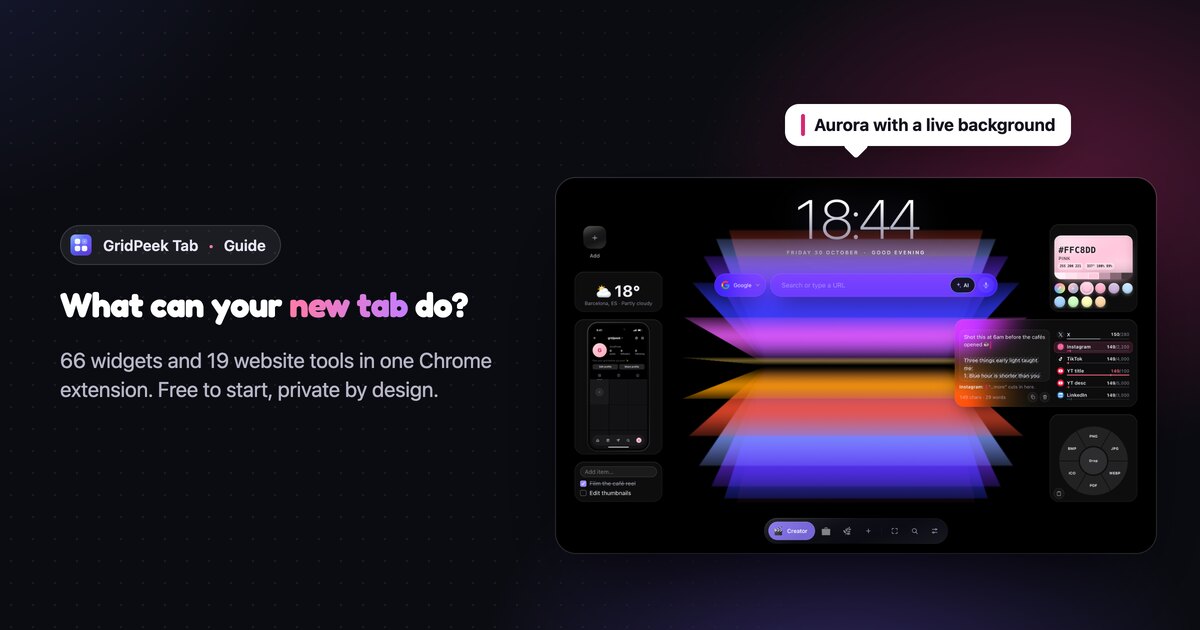
- Themes. Nine of them change where your pages sit and how everything is drawn. Aurora puts a huge clock and the search box in the middle, floats your pages in a dock at the bottom, and draws every tile as frosted glass. There is also a 90s Retro PC taskbar, if that's more your mood.
- Live backgrounds. Snow, stars, sakura petals or fireworks drifting behind your tiles, or slow animated colour scenes like Color Panels, the one in these screenshots. You can have it play all the time or only after the page has been left alone for a few minutes.
- Canvas layout. Drop each widget exactly where you want it. Keep the middle clear so the background shows, and put your tools around the edges, like the pages here.
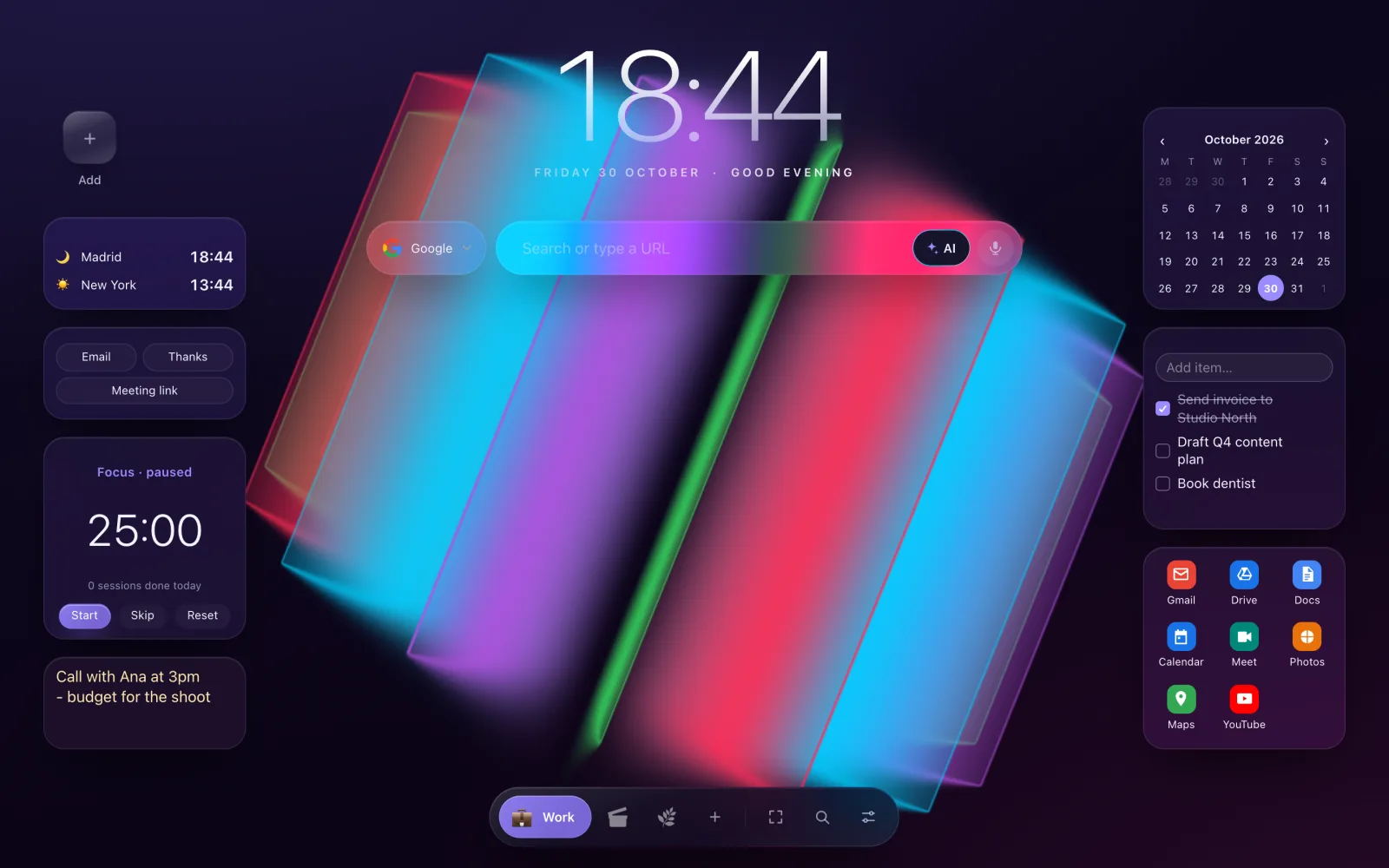
The backgrounds ship inside the extension and are drawn by your own browser, so nothing is downloaded. One switch turns them off when your laptop is on battery.
How much does GridPeek Tab cost?
Installing is free, and every widget and tool without a Pro badge stays free. No trial clock on those, no ads paying for them.
Pro unlocks every widget and tool, unlimited pages, the Aurora theme and the other Pro themes, and the animated backgrounds like Color Panels:
| Plan | Price | Works out to |
|---|---|---|
| Free | $0 | 30 widgets, 5 website tools and 3 pages |
| Pro monthly | $2.99 a month | $35.88 a year |
| Pro yearly | $19.99 a year | about $1.67 a month |
| Pro lifetime | $49 once | nothing after that |
Every Pro widget can be tried free for 7 days, with no card. If you don't buy, the free widgets keep working and nothing you made is deleted.
Which paid apps can GridPeek Tab replace?
Here are the numbers. Each price below comes from the company's own pricing page on 30 October 2026.
| What you need | A popular paid app | Their price | In GridPeek Tab |
|---|---|---|---|
| A nicer new tab | Momentum Plus | $39.95 a year | The whole extension |
| Blocking distracting sites | Freedom | $8.99 a month | Site Limits |
| Voice typing on websites | Wispr Flow Pro | $15 a month | Dictation |
| Knowing when a page changes | Visualping Personal | $14 a month | Page Watcher |
| Seeing where your time goes | RescueTime Solo | $9 a month | Screen Time |
| Planning your Instagram grid | Planoly Starter | $14 a month | Grid Preview |
| Background focus sounds | Noisli Pro | €8 a month, billed yearly | Focus Sound |
Add up just the monthly prices of Freedom, Wispr Flow, Visualping, RescueTime and Planoly and you are past $60 a month. GridPeek Tab Pro is $19.99 a year.
To be fair to those apps, they go further than our widgets in places, and if you need that, pay for them:
- Freedom blocks apps and sites on your phone too. Site Limits only works in Chrome.
- Wispr Flow types into any app on your computer. Dictation works in text boxes in the browser.
- Visualping checks pages from its own servers, even when your computer is off. Page Watcher checks while Chrome is running.
- RescueTime tracks desktop apps. Screen Time only counts websites.
- Planoly schedules and publishes posts for you. Grid Preview only shows you how they will look. For a bigger, free version of that preview, there is also the Instagram grid planner on this site.
For most people, though, the browser is where these jobs happen anyway, and the simple version is enough.
Which widgets come with GridPeek Tab?
Here is the full list, grouped the way the extension groups them, with what each one is good for. Pro widgets are marked.
Essentials
- Note. Saves as you type. Paste a phone number from a call and it is still there tomorrow.
- Checklist. Type, press Enter, tick it off. Your shopping list lives on the page you open all day.
- Link and Folder. One-click tiles for your sites. Put every work tool in one Folder and your page stays tidy.
- Text Snippets. Your email address, your bank details, a polite "thanks, I'll reply by Friday". One click copies it.
- Google Apps. Gmail, Drive, Docs, Calendar, Meet and the rest behind one tile.
- Kanban Board (Pro). To do, Doing, Done. Drag a card along as a project moves.
- Voice Notes (Pro). Say it instead of typing it. Good for ideas you get halfway through something else.
Creator tools
GridPeek started as an Instagram grid planner, so this is the group we put the most work into.
- Grid Preview (Pro). Drop your next posts onto a phone showing your Instagram or TikTok profile and drag them around until the feed looks right, before anything goes live.
- Caption Check (Pro). Shows where Instagram, TikTok, LinkedIn and YouTube cut your caption behind "…more", and when you go over X's 280 characters. We wrote a full Caption Check tutorial with the limits for each platform.
- Teleprompter (Pro). Paste a script and it scrolls past a reading line at the words per minute you set. Talking-head videos without the "um, where was I".
- Trend Radar (Pro). One search box for the platforms you post on, a watchlist of hashtags to check each day, and links to each platform's own trending page. It never logs in to anything.
- Color Drop (Pro). Your brand colours one click from your clipboard, plus an eyedropper for any colour on screen.
- Convert Wheel (Pro). Drag an image onto PNG, JPG, WebP and more, and it downloads in that format. Handy when a site refuses your WebP.
- Date Ticket (Pro). Turns "dinner Friday at 8" into a ticket-style picture you can send in a chat.
Time
- Calendar. Your month with your own events. You can also paste a Google or iCloud calendar link to see those events here.
- Pomodoro. 25 minutes on, 5 off, switching by itself. The easiest way to start a task you have been avoiding.
- Timer / Stopwatch, Clock and Countdown. The countdown is great for a launch date or a holiday.
- World Clocks. Know at a glance whether it is too late to message someone in Tokyo.
- Year Progress. A bar showing how much of the year is gone. Mildly alarming, in a useful way.
- Time Converter (Pro). Pick 3pm your time and see what that is for a client in New York and Los Angeles.
Focus and wellbeing
- Today's Focus. Write the one thing that matters today. It greets you on every new tab.
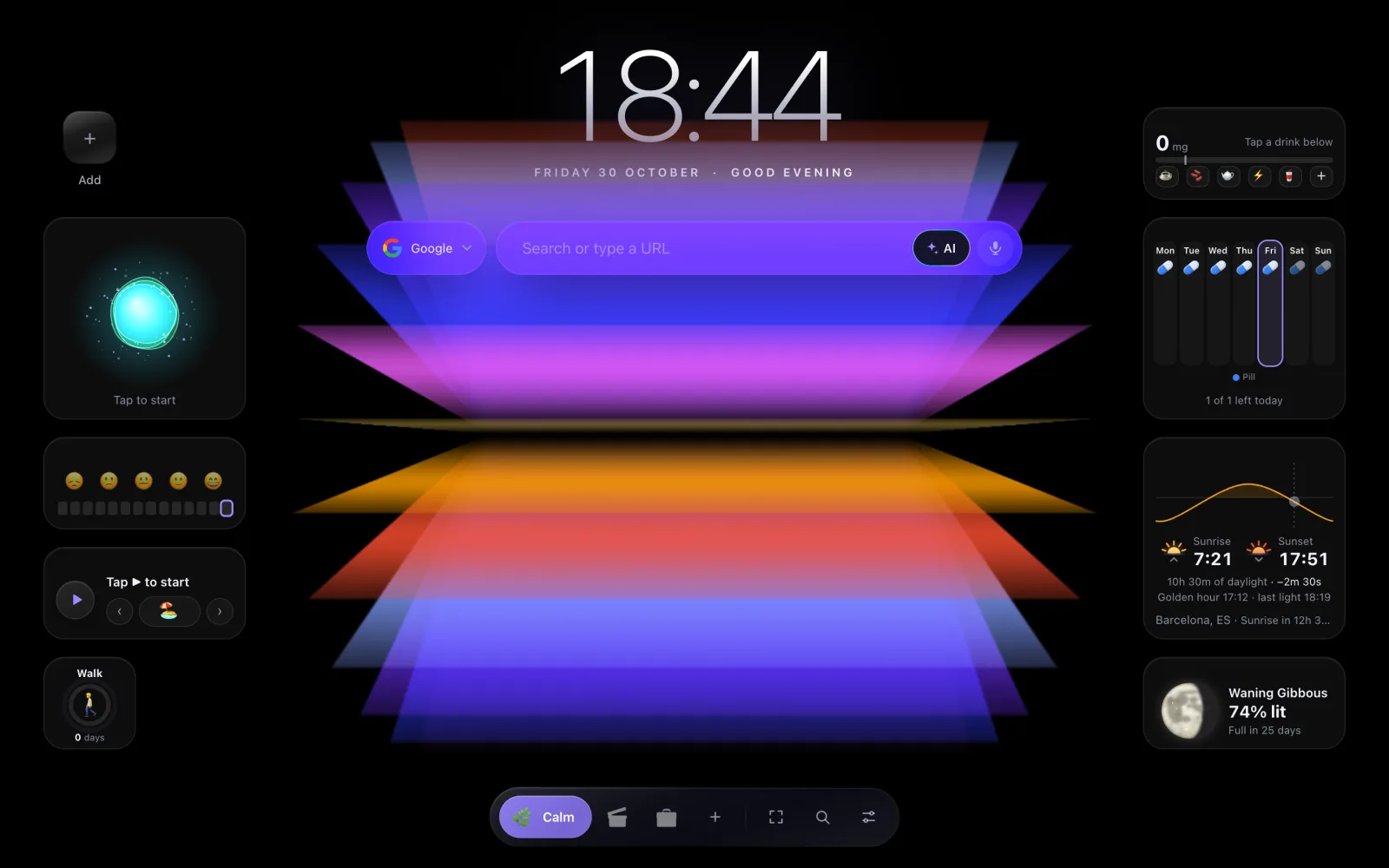
- Breathing. A shape that grows and shrinks to pace your breath. One minute before a call helps more than you'd think.
- Habit Streak. Tick a habit off each day and watch the streak grow.
- Focus Sound (Pro). Rain, forest, café and more, generated in your browser, so nothing downloads.
- Mood Log (Pro). One tap a day. After a month you see which days are hard.
- Caffeine (Pro). Log your coffees and it estimates how much caffeine is still in you at bedtime.
- Pill Tracker (Pro). Tick off each dose, so you never wonder whether you already took it.
Info
- Weather, Sunrise & Sunset, Moon Phase, Battery and Daily Quote, all free.
- News (RSS) (Pro). Headlines from the sites you pick, not from an algorithm.
- Market Ticker (Pro). The stocks, coins and currencies you follow, with how they moved.
- Flight Tracker (Pro). Type a flight number and follow the plane live. Perfect for airport pickups.
- Route (Pro). Your commute from Google Maps, with traffic, before you leave.
- Air Quality (Pro). Whether today is a good day for a run.
- Live Embed (Pro). Any live page in a tile, like a scoreboard or a status page.
Learn
- Flashcards (Pro). Spaced repetition: hard cards come back soon, easy ones much later.
- Know This (Pro). One card a day on something useful, like spotting a scam or basic first aid.
- Flag Quiz (Pro). Guess the country from its flag.
Entertainment
Six free games for a five-minute break: Dino Run, Tetris, Snake, Pong, Breakout and 2048. Plus Now Playing (Pro), which plays, pauses and skips the music in any tab without hunting for it.
Money and admin
- Subscriptions (Pro). List what you pay for and see the monthly total and which one renews next. A good way to catch the trial you forgot to cancel.
- Safe to Spend (Pro). Set your budget and payday, and it tells you what you can spend today.
- Life Admin (Pro). Type "rent 1200 on the 1st monthly" and it becomes a repeating reminder.
- Work Cost (Pro). Turns prices into hours of your work. A 14-hour pair of headphones is easier to skip.
- Rental Profit (Pro). What a short-term rental really makes a month, and where it breaks even.
- Label Printer (Pro). Shipping or product labels with a QR code or barcode, printed in one click.
Fun and tools
- Calculator, Emoji Board and Photo Frame, free.
- Generator (Pro). A strong password or a memorable passphrase in one click.
- Decision Maker (Pro). Coin, dice or a wheel of your own options.
- Travel Globe (Pro). Click the countries you've been to and collect passport stamps.
- Cat Companion (Pro). A small cat that naps on your page and purrs when you stroke it. It needs feeding.
- Fridge (Pro). A retro fridge with magnets, where you can hide links on the shelves.
- Rage Clicks (Pro). Smash things on screen after a bad meeting. Nobody gets hurt.
What can GridPeek Tab do on other websites?
These 19 tools work outside the new tab. Each one is off until you switch it on in Settings, and Chrome asks for permission first.
- On Websites (free). Your pages and links in a slim bar or floating dock on any site.
- Save Tabs (free). Thirty tabs open? Close them all into one folder and reopen them later.
- Markdown (free). Right-click to save a page, or just your selection, as clean Markdown for notes or an AI chat.
- Toolbar Button (free). Save the site you're on to a page in one click.
- Search (free). Search from your page with the engine you choose.
- Site Limits (Pro). Give YouTube 30 minutes a day. When the time is up, it's blocked until tomorrow.
- Screen Time (Pro). How long you spend on each site, by day or by hour, counted on your device.
- Page Watcher (Pro). Watch a page, or part of one, for a price drop or a "back in stock", and get a notification when it changes.
- Dictation (Pro). Hold a key, talk, let go, and the words appear where your cursor is.
- Floating Snippets (Pro). Your Text Snippets in any text box on any site.
- Clip to Notes (Pro). Select text on a page and send it to one of your notes, with the link.
- Highlighter (Pro). Highlights that are still there when you come back to the page.
- Video Speed (Pro). Watch any video faster or slower than the site allows.
- Eye Care (Pro). A reminder every 20 minutes to look away for 20 seconds, plus a night mode for websites.
- Workspaces (Pro). Each page keeps its own tabs, so work tabs disappear at the weekend.
- Convert Wheel (Pro). The image converter, on any site.
- Typing Sounds (Pro). Mechanical keyboard sounds as you type. Oddly satisfying.
- Floating Vinyl (Pro). A record that spins on websites while your music plays.
- Notch Companion (Pro). A little character at the top of the screen that shows what's playing.
Does GridPeek Tab track what you do?
No. There are no accounts, no ads, no analytics and no tracking, and your data is never sold.
Your pages, notes and settings are stored in Chrome's own extension storage. Photos you upload stay on your device. The extension only talks to the internet for widgets you add that need it, like weather from Open-Meteo or prices for your Market Ticker, and the privacy policy lists every one of those requests and what it sends.
Tools that sound nosy are built to stay local. Screen Time keeps only site names and totals for 35 days, on your device. Typing Sounds is told whether you pressed a letter or Enter, never which key. Dictation never stores what you say, though Chrome's own speech recognition may send the audio to its speech service to turn it into text, the same as voice typing anywhere else in Chrome.
Is GridPeek Tab still being worked on?
Constantly. It went live on the Chrome Web Store on 27 October 2026. Version 3.1 arrived the next day with the ready-made pages and the canvas layout, and version 3.2 followed two days after that. Chrome installs updates by itself, so new widgets just show up in your + Add menu.
If there is a widget you wish existed, tell us.
We're also writing a tutorial for each widget, one at a time, starting with Caption Check. Check back on the blog for the next ones.
What GridPeek Tab can't do (yet)
- It only runs on desktop. Chrome on phones doesn't support extensions.
- Chrome first. Edge and Brave can install it from the Chrome Web Store. Firefox and Safari can't.
- The interface is in English. The widgets handle any language you type, but buttons and labels are English for now.
- It's not a social media scheduler. Grid Preview, Caption Check and Trend Radar help you plan, but nothing posts for you or connects to your accounts. That's on purpose.
How to set it up in two minutes
- Add GridPeek Tab from the Chrome Web Store.
- Open a new tab. The short tour shows you around, and you can pick a ready-made page to start with.
- Press N or click + Add to put any widget on your page. Drag tiles to where your hand already goes.
- Want the Pro widgets? Start the 7-day trial from any Pro widget. No card needed.
If you post on Instagram, start with the Creator page. It puts Grid Preview, Caption Check, Color Drop, Convert Wheel, a checklist and the Teleprompter on one screen, and it's the quickest way to see what the extension is for.
Frequently Asked Questions
Is GridPeek Tab free?
Yes. It is free to install, and every widget and tool without a Pro badge stays free for good. That includes up to 3 pages, notes, checklists, the calendar, Pomodoro, weather, world clocks, six games, Save Tabs, the Classic and Dock themes and the particle backgrounds like snow and stars. Pro unlocks the rest, including the Aurora theme, and costs $2.99 a month, $19.99 a year or $49 once. You can try Pro free for 7 days with no card.
Does GridPeek Tab work in Edge or Brave?
It is built for Chrome, and browsers that install extensions from the Chrome Web Store, like Microsoft Edge and Brave, can add it too. It does not run on phones, because mobile Chrome does not support extensions.
Does GridPeek Tab collect my data?
No. There are no accounts, ads, analytics or tracking. Your pages, notes and settings live in Chrome's own extension storage and sync only through your own Chrome sign-in. The few network requests it makes, like weather or market prices, happen only for widgets you add, and the privacy policy lists each one.
Is GridPeek Tab a good Momentum alternative?
If you like Momentum's calm new tab but want more than a photo, a clock and a to-do list, yes. GridPeek Tab gives you several pages of tiles and 66 widgets, and its yearly Pro plan is $19.99, about half of Momentum Plus at $39.95 a year. If all you want is a beautiful photo and a greeting, Momentum is simpler.
Can I move my Chrome bookmarks into GridPeek Tab?
Yes. In the New page dialog you can import your Chrome bookmarks into pages. The extension reads them once on your device, and your bookmarks in Chrome are never changed.
How often does GridPeek Tab get new widgets?
Often. The extension went live on the Chrome Web Store on 27 October 2026, version 3.1 followed on 28 October and 3.2 on 30 October. New widgets and fixes ship as they are ready, and Chrome installs updates for you.
About the author
GridPeek Team
The GridPeek team builds free, in-browser tools for Instagram creators (grid planning, image splitting, watermarking, background removal, hashtag generation, image blurring, and profile picture preview) and shares practical resources and articles to help creators grow.
Related Tool Suite
Build a Complete 2026 Content Workflow
Need related tools? Use this connected stack to plan your grid, split carousel visuals, watermark brand content, remove logo backgrounds, generate hashtags, and blur sensitive details with modern creator-ready UX.