Where Does Instagram Cut Off Your Caption? A Caption Check Tutorial
Instagram shows roughly the first 125 characters or two lines of a caption in the feed, whichever comes first. Everything after that hides behind “…more”, and most people never tap it. The full limit is 2,200 characters, but the part that does the work is the bit before the fold.
The annoying part is that you only see where the fold lands after you post. Caption Check is a widget in GridPeek Tab, our Chrome new tab extension, that marks the fold in your text while you are still writing. It does the same for TikTok, X, YouTube, LinkedIn, Threads, Bluesky and Pinterest, so one caption can be checked against all of them at once.
Where does Instagram cut off a caption?
Two rules decide it, and the second one catches people out.
The character rule. Around 125 characters in, the text stops and “…more” appears.
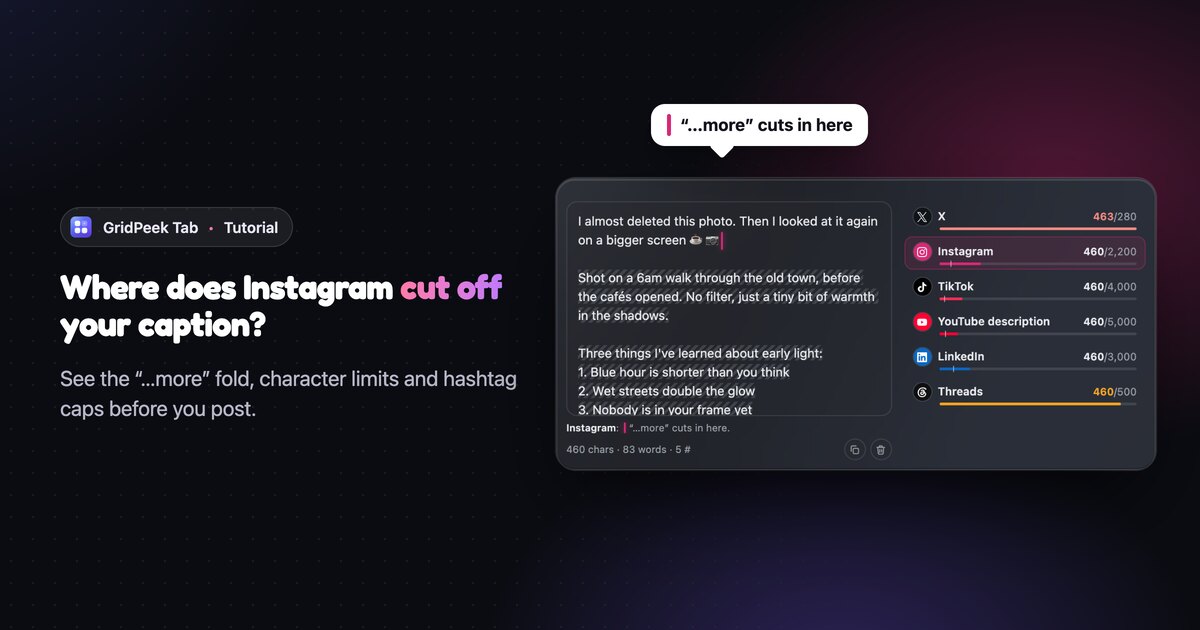
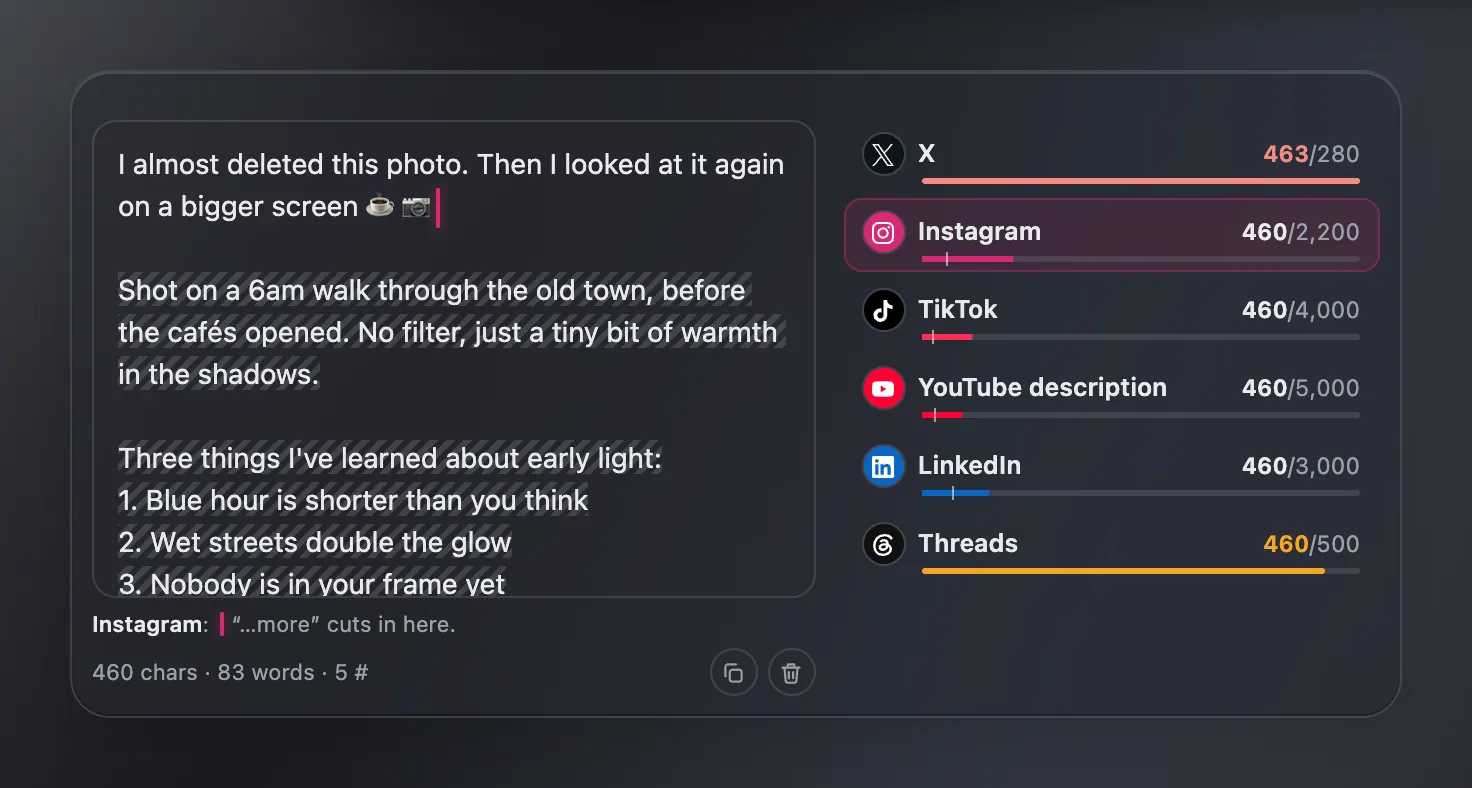
The line rule. Instagram only shows two lines before the fold, and a blank line counts as one of them. Look at the screenshot above: the caption is 460 characters, but only the first sentence shows. That is because the hook is followed by an empty line. Line one is the hook, line two is the blank, and the fold lands right after the coffee emoji.
That is not always bad. A short hook followed by a gap is a common trick to make people tap. But if you meant for the second sentence to show, you would never know from the editor in the Instagram app. Caption Check puts a pink caret where the cut happens and hatches everything a follower only sees after tapping.
How do you add Caption Check to your new tab?
- Install GridPeek Tab from the Chrome Web Store. It works in Chrome, and in Edge and Brave since they install from the same store.
- Open a new tab and click the + Add tile on your page, or press N.
- Pick Creator in the list on the left, then Caption Check.
- Choose a size. Wide (the default) and Extra large put the meters beside the text box. Large and Tall stack them underneath, which suits a narrow column.
- Tick the platforms you post to. Six are on by default: X, Instagram, TikTok, YouTube title, YouTube description and LinkedIn. Threads, Bluesky and Pinterest are one click away.
- Click Save.
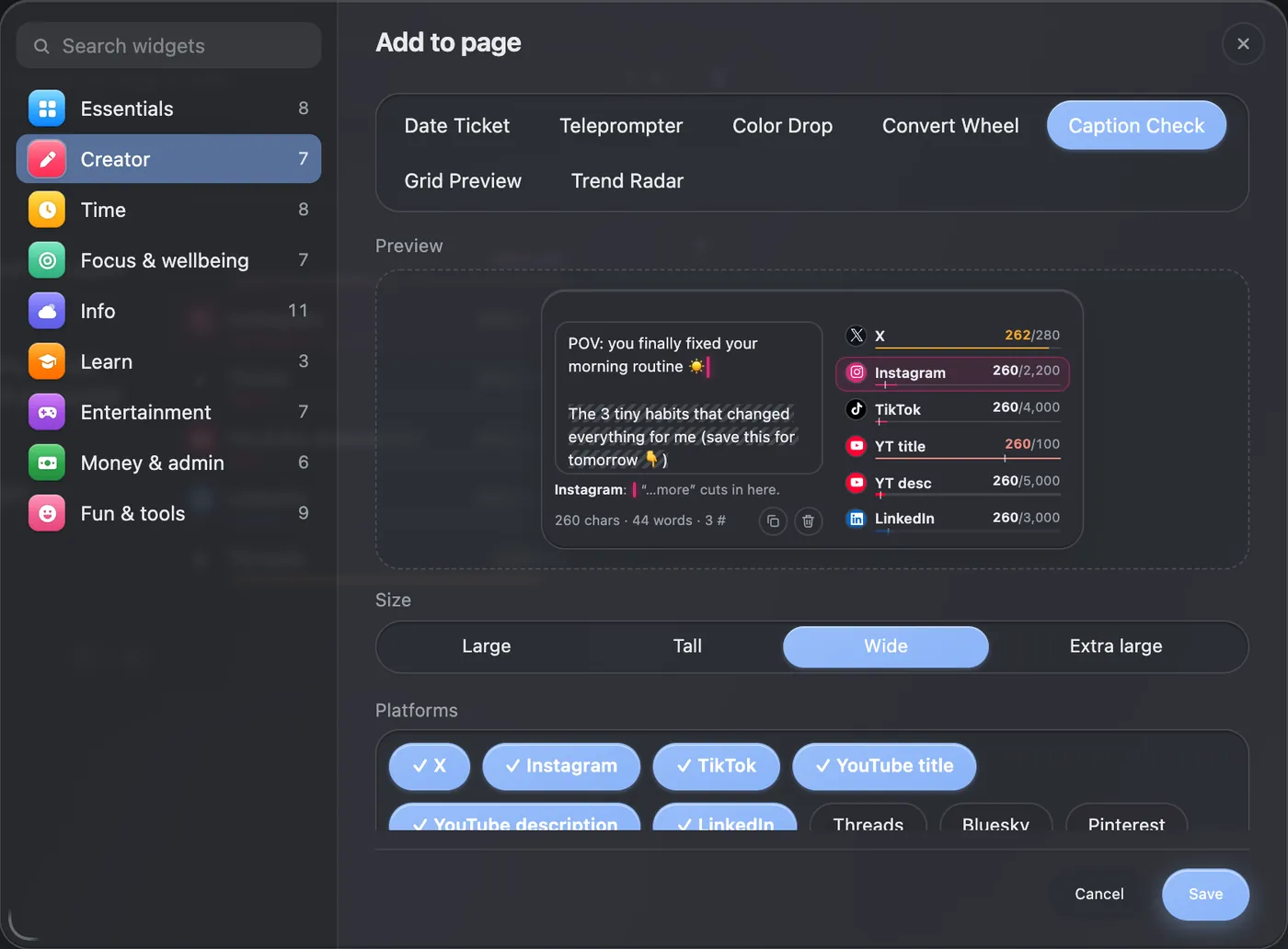
The preview in that dialog is live, so you can type into it before saving to see how the widget behaves. Nothing typed there is kept.
Caption Check is a Pro widget. If you haven't used Pro yet, there is a 7-day free trial that doesn't ask for a card.
How do you read the platform meters?
Each platform gets one row: its name, your count against its limit, and a bar.
- The bar fills as you type. It stays in the platform's colour while you are under 90% of the limit, turns amber from 90%, and red once you go over.
- The small tick on the bar marks where “…more” sits for that platform. If your fill passes the tick, the caption is folded there.
- The count reads as your characters over the limit, like 460/2,200. Hover a row and it spells it out: “Instagram: 460 of 2,200 · about 125 show before ‘…more’”.
Click any row to make it the active platform. The text box then shows that platform's marks: the fold caret, the hatched hidden part, and red over anything past the limit. A line under the box says what is going on in plain words, for example “Instagram: ‘…more’ cuts in here.” or “fits, 41 to spare.”
What happens when the same caption goes to X?
Here is the same caption with X selected instead of Instagram.
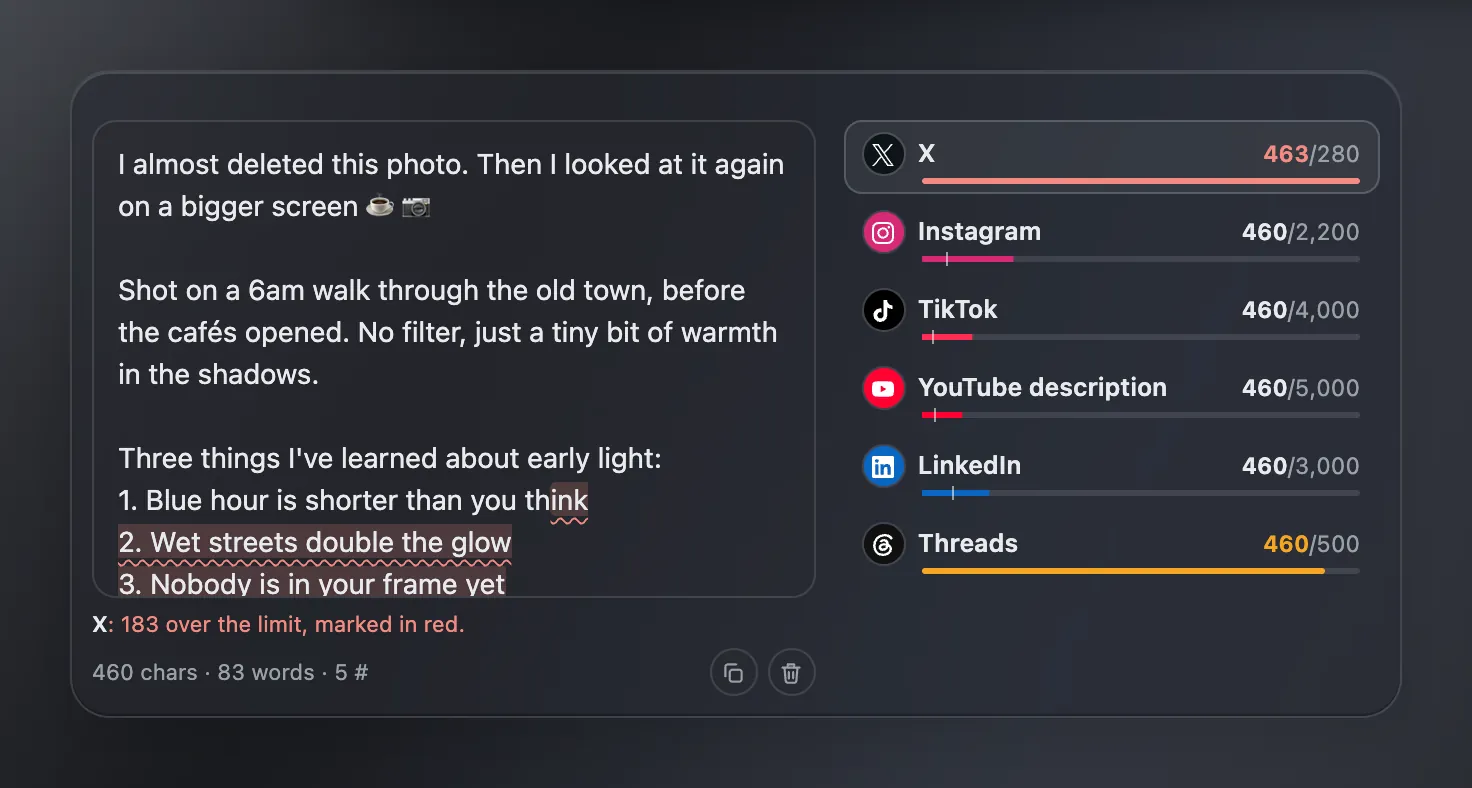
Everything from the end of the first list item onward is shaded red: that is the part X would reject. The note underneath gives the exact number, 183 over.
Look closely at the counts. Every other platform says 460, but X says 463. That is not a bug. X counts emoji as 2 characters, and this caption has three of them (☕ 📷 👇). X also counts every link as 23 characters, however long the actual URL is, because it shortens them all. Caption Check applies both rules, so the number you see is the number X will use.
Why is there a hashtag warning?
Add a sixth hashtag to an Instagram caption and the note turns amber:
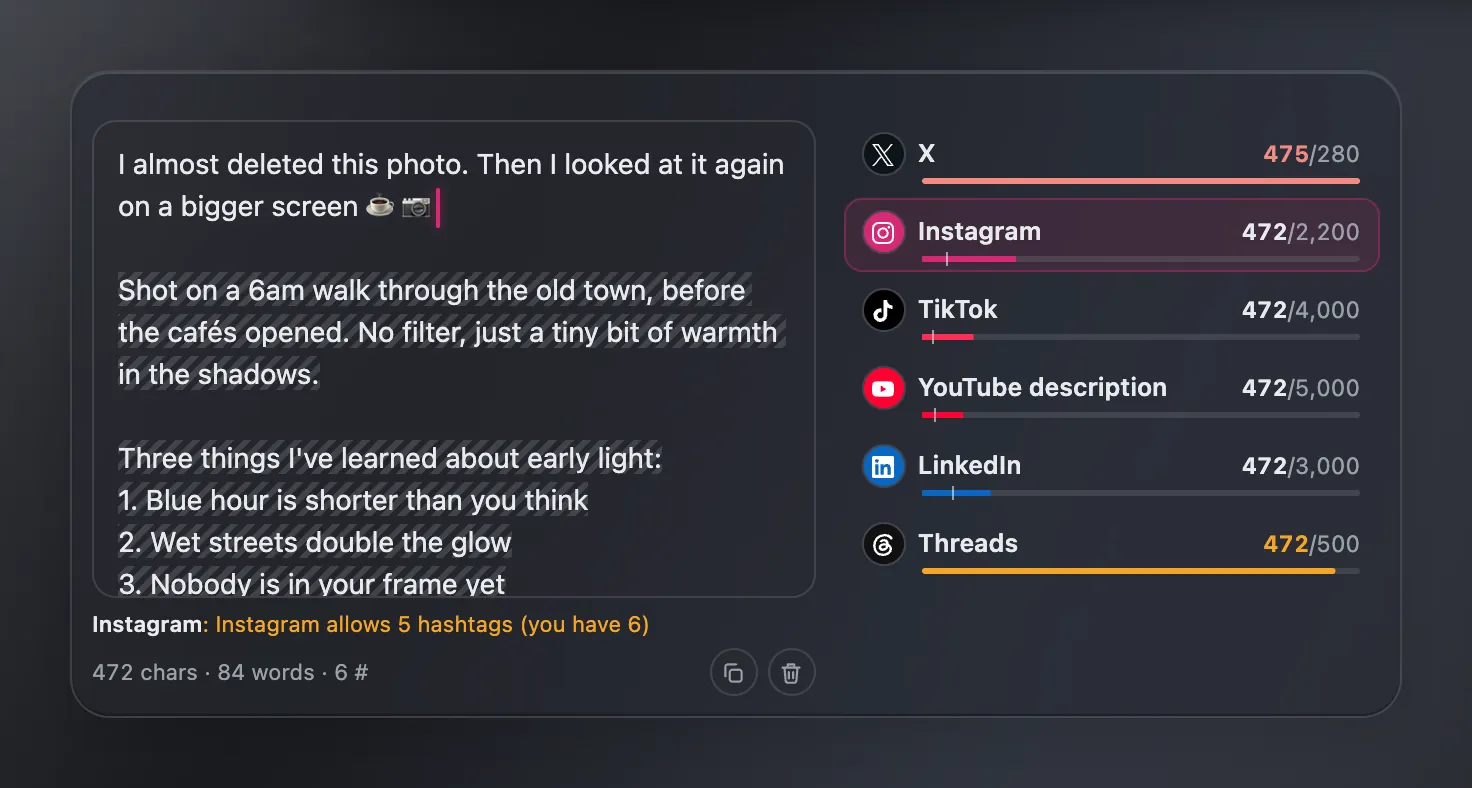
Instagram cut posts and Reels down to 5 hashtags in December 2025, so the sixth is wasted. The widget knows the caps for the platforms that have one: 5 on Instagram and TikTok, and 1 topic tag on Threads. YouTube is the odd one out: it has no small cap, but if a video has more than 60 hashtags it ignores every one of them, so the widget warns you at 61. While a warning is showing, it takes the place of the fold note, so fix the warning first and the fold marker comes back.
The footer keeps a running tally as well: characters, words and hashtags (“472 chars · 84 words · 6 #”). If you are trimming a tag set down to five, the GridPeek hashtag generator helps you pick which ones stay.
Caption limits and “…more” folds by platform
These are the numbers Caption Check works with. Platforms change them from time to time, and the “…more” positions are estimates, so treat this table as a guide rather than the rulebook.
| Platform | Character limit | Shown before “…more” | Hashtag cap |
|---|---|---|---|
| 2,200 | about 125 or 2 lines | 5 | |
| TikTok | 4,000 | about 100 or 2 lines | 5 |
| X | 280 | no fold | none |
| Threads | 500 | no fold | 1 |
| Bluesky | 300 | no fold | none |
| 3,000 | about 210 or 3 lines | none | |
| YouTube title | 100 | about 70, one line | none |
| YouTube description | 5,000 | about 157 or 3 lines | 60 (more and all are ignored) |
| 500 | about 50, one line | none |
YouTube gets two extra checks. Titles are one line only, so the widget warns you if your title has a line break (YouTube drops it). And YouTube does not accept the < or > characters anywhere, so those get flagged too.
Small things that save time
- Copy sits in the footer. One click puts the whole caption on your clipboard, ready to paste into the app.
- Clear empties the box, and ⌘Z (Ctrl+Z on Windows) brings it back if you didn't mean it.
- It saves as you type. Close the tab, open a new one, and your draft is still there. The caption is stored in your browser on this device only.
- Emoji count the way you see them. A thumbs up with a skin tone is two code points under the hood, and a family emoji is up to seven. Caption Check counts each as one character, the way a reader sees it, instead of inflating your total the way a plain character counter does.
What Caption Check can't tell you
The fold positions are estimates. Apps cut by the width of the screen, not by a fixed character count, so on a small phone or with large text turned on, “…more” can land a few words earlier than the marker. If the last words before the fold really matter, leave yourself some margin.
It also doesn't post anything for you and doesn't look at your accounts. It is a writing check, not a scheduler.
Where it fits with the rest of your workflow
Caption Check tells you how much of your caption people see. What you put in that visible part is a separate job. The Instagram hook generator gives you opening lines built to fit before the fold. Once the caption is done, the Instagram grid planner shows how the post sits next to the rest of your feed before you publish it.
Want to try it? Add GridPeek Tab to Chrome, open a new tab, press N, and paste in the caption you were about to post.
Frequently Asked Questions
How many characters show before “…more” on Instagram?
About 125 characters, or two lines, whichever comes first. A blank line counts toward those two lines, so a one-line hook followed by an empty line is often all a follower sees in the feed. The app cuts by screen width, so treat 125 as a close guide rather than an exact number.
What is the Instagram caption character limit?
2,200 characters. Caption Check counts the way a reader sees text, so an emoji with a skin tone counts as one character, and it marks anything past 2,200 in red.
Why does X show a higher count than Instagram for the same caption?
X weighs text differently. Emoji and most non-Latin characters count as 2, and every link counts as 23 no matter how long it is, because X shortens links to t.co. Caption Check follows the same rules, so its X count matches what X will say.
Is Caption Check free?
Caption Check is a Pro widget in GridPeek Tab. You can try every Pro widget free for 7 days with no card needed, and the free version of GridPeek Tab keeps all the widgets without a Pro badge.
Does Caption Check post to Instagram or read my account?
No. It never connects to any social account. Your caption is saved in your browser on this device, and nothing is sent anywhere.
About the author
GridPeek Team
The GridPeek team builds free, in-browser tools for Instagram creators (grid planning, image splitting, watermarking, background removal, hashtag generation, image blurring, and profile picture preview) and shares practical resources and articles to help creators grow.
Related Tool Suite
Build a Complete 2026 Content Workflow
Need related tools? Use this connected stack to plan your grid, split carousel visuals, watermark brand content, remove logo backgrounds, generate hashtags, and blur sensitive details with modern creator-ready UX.