Brauchen Solo-Creator ein automatisch nachführendes Stativ?
Dieser Beitrag enthält Amazon-Affiliate-Links. Wenn Sie über einen davon kaufen, erhält GridPeek eventuell eine kleine Provision, ohne dass für Sie Mehrkosten entstehen. Wir empfehlen nur Dinge, die wir auch einem Freund empfehlen würden.
Kurz gesagt: Wenn Sie solo filmen, also niemand hinter der Kamera steht, um Sie während der Bewegung neu ins Bild zu rücken, löst ein automatisch nachführendes Stativ ein echtes Problem. Filmen Sie von einem festen Punkt aus oder haben immer eine zweite Person dabei, die filmt, brauchen Sie wahrscheinlich noch keins.
Wir bauen bei GridPeek Software-Tools für die Planungs- und Bearbeitungsseite von Instagram-Content, keine Hardware, hier schauen wir uns also die andere Hälfte des Workflows an: was passiert, bevor ein Foto oder Clip überhaupt in ein Bearbeitungstool gelangt.
Welches Problem löst ein automatisch nachführendes Stativ?
Der konkrete Fehlerfall, den es behebt: Sie filmen allein ein Reel oder TikTok, bewegen sich beim Sprechen oder Demonstrieren, und am Ende des Clips sind Sie aus dem Bild gedriftet. So lange neu zu drehen, bis der Bildausschnitt passt, oder um einen schlecht gerahmten Clip herumzuschneiden, kostet mehr Zeit als das Stativ selbst.
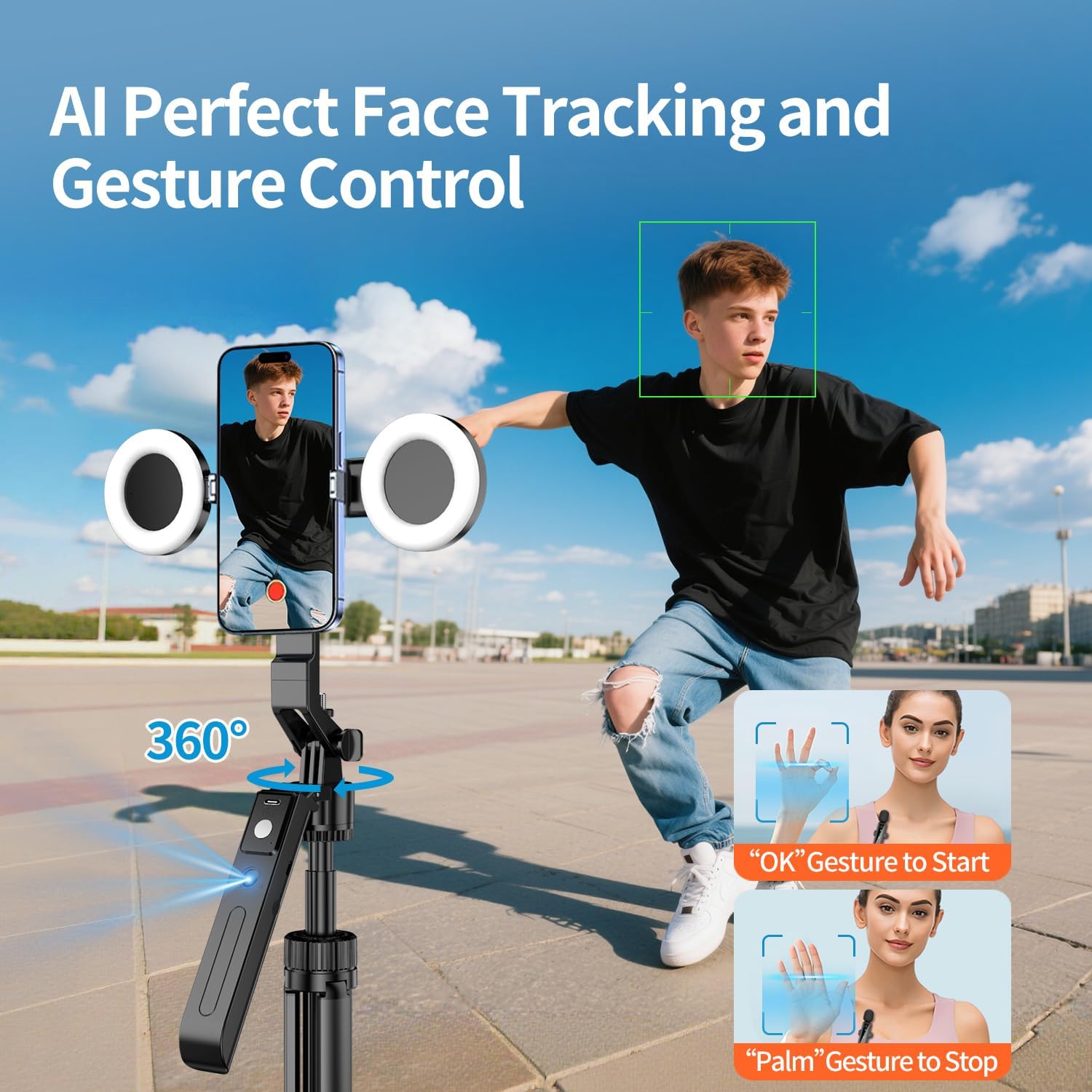
Magnetisches Vlogging-Kit für iPhone/Android ist genau dafür gebaut: ein 180-Zentimeter-Stativ mit Motor, der Ihrem Gesicht bei Bewegung folgt, kombiniert mit einer magnetischen Handyhalterung, einem Clip-Licht, einem lavaliermikrofonartigen Mikrofon und einer Fernbedienung.

Ist die Magnethalterung sinnvoll, oder nur Spielerei?
Das ist der Teil, den man leicht unterschätzt, bevor man ihn selbst besitzt. Eine Magnethalterung bedeutet, dass das Handy per Klick befestigt wird, statt jedes Mal an einer Federklemme herumzufummeln, wenn Sie die Position ändern, was mehr zählt, als es klingt, sobald Sie mehrere Takes hintereinander filmen. Der Kompromiss: Es funktioniert nur mit einer Magnethülle oder einem Magnetring am Handy, prüfen Sie das also vor dem Kauf, falls Sie noch keins verwenden.
Was ist enthalten, und was werden Sie tatsächlich nutzen?
Das Kit bündelt vier Dinge: die Stativbasis mit automatischem Tracking, eine magnetische Handyhalterung, ein Clip-LED-Licht, ein Mikrofon und eine Bluetooth-Fernbedienung. In der Praxis:
- Stativ und Halterung sind der Kernwert. Dafür bezahlen die meisten Käufer eigentlich.
- Das Licht ist beim Filmen drinnen wirklich nützlich, wenn Sie noch kein Ringlicht oder Fensterlicht haben.
- Das Mikrofon ist ein solides Extra im Kit, aber wenn Ihnen Audioqualität für Ihren Content wirklich wichtig ist, übertrifft ein dediziertes Lavaliermikrofon meist ein mitgeliefertes.
- Die Fernbedienung ist praktisch, aber kein Kaufkriterium in die eine oder andere Richtung.
Wer sollte kaufen, und wer sollte es sich sparen
Kaufen, wenn: Sie regelmäßig solo Talking-Head- oder Demo-Content für Reels, TikTok oder Shorts drehen und schon bemerkt haben, dass Sie aus dem Bild driften oder Takes wegen Neupositionierung verschwenden. Wenn Sie beim Gehen oder Bewegen durch einen Raum filmen statt an einem Ort zu bleiben, löst ein Gimbal ein anderes Problem als dieses Kit.
Sparen, wenn: Sie überwiegend statischen Content drehen (Produktfotos von oben, gestellte Fotos), bei dem die Kamera nichts verfolgen muss, oder immer jemand anderen die Kamera bedienen lässt. Ein einfaches festes Stativ erledigt den Job dann günstiger.
Wo das in Ihren tatsächlichen Workflow passt
Filmen ist Schritt eins. Was Sie danach mit dem Material machen, ist der Bereich, in dem GridPeeks Tools ansetzen:
- Ein breites oder panoramaartiges Bild mit dem Bild-Splitter in Karussell-Kacheln aufteilen.
- Ihr Logo oder Handle vor der Veröffentlichung mit dem Branding- und Wasserzeichen-Tool als Wasserzeichen hinzufügen.
- Mit dem Instagram-Grid-Planer planen, wo der fertige Post in Ihrem Feed landet.
- Das Hashtag-Set für den fertigen Post mit dem Hashtag-Generator erstellen.
Mehr dazu, was sich für ein Creator-Setup zu kaufen lohnt, in unserer größeren Übersicht: Welche Tools brauchen Instagram-Creator 2026 wirklich?
Häufig gestellte Fragen
Funktioniert das automatische Tracking zuverlässig?
Gesichts-Tracking-Stative in dieser Preisklasse tracken bei gutem Licht gut und tun sich bei wenig Licht oder schnellen, unregelmäßigen Bewegungen schwerer. Für ruhigen Walk-and-talk-Content funktioniert es gut.
Brauche ich die dazu passende Magnethülle?
Funktional gesehen ja. Ohne eine Magnethülle oder einen dünnen Magnetring am Handy hält die Halterung das Handy während der Tracking-Bewegung nicht zuverlässig.
Ist das besser, als einfach einen Freund bitten, mich zu filmen?
Für Konstanz ja. Ein Stativ wird nicht müde, lässt sich nicht ablenken und ist immer verfügbar, was zählt, wenn Sie täglich oder mehrmals pro Woche posten.
About the author
GridPeek Team
Das GridPeek-Team entwickelt kostenlose Tools direkt im Browser für Instagram-Creator (Grid-Planung, Bildaufteilung, Wasserzeichen, Hintergrundentfernung, Hashtag-Generierung, Bildunschärfe und Profilbild-Vorschau) und teilt praxisnahe Ressourcen und Artikel, die Creators beim Wachstum helfen.
Verwandte Tool-Suite
Ihr kompletter Content-Workflow für 2026
Brauchen Sie noch mehr Werkzeuge? Nutzen Sie diesen verbundenen Stack, um Ihr Grid zu planen, Karussell-Visuals aufzuteilen, Markeninhalte mit Wasserzeichen zu versehen, Logo-Hintergründe zu entfernen, Hashtags zu generieren und sensible Details zu verwischen, alles mit moderner, creator-tauglicher Bedienung.